ADDA Software Updates

Release Alert:


Problem Statement

Currently, Purchase Orders (POs) are sent to only one vendor email ID, creating a single point of communication.


In most vendor organizations, multiple stakeholders (such as procurement, accounts, or operations teams) handle orders. When the PO is sent to just one contact:

1. It may be missed if the person is unavailable or on leave

2. Other stakeholders remain unaware of the PO

3. This leads to delays in order processing and delivery

4. Admins need to manually follow up or resend POs


As a result, communication gaps occur even though the PO is successfully sent from the system.


What's New:

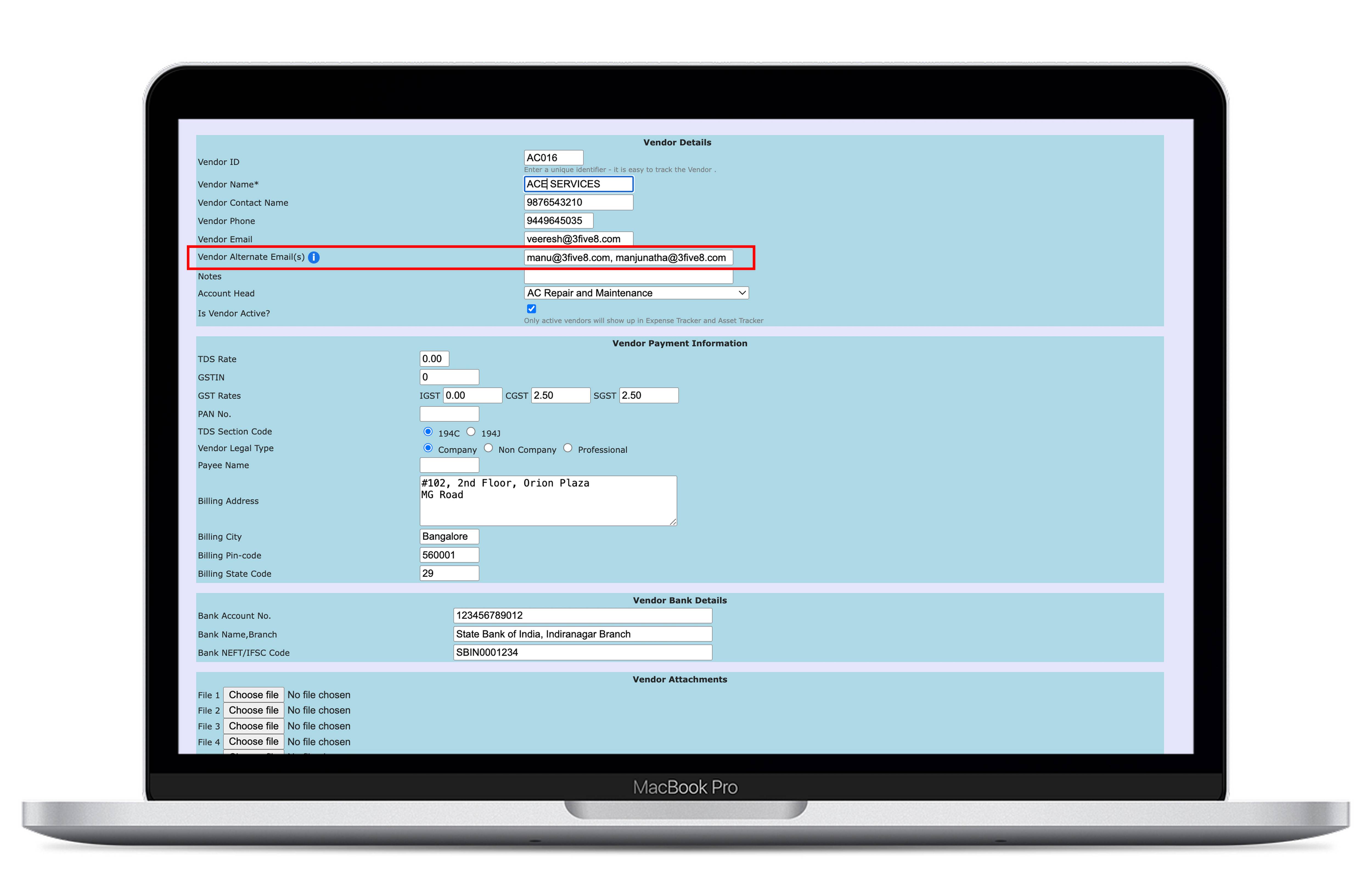
1. Added support for multiple email IDs (comma-separated) in vendor details

2. Introduced Vendor Alternate Email field

3. All configured emails (primary alternate): Are visible in the Approved PO view; Receive the PO when “Email to Vendor” is triggered

4. Added tooltip guidance for entering multiple email IDs


Path:

Expense Tracker → By Vendor → Add/Edit Vendor


Benefits:

1. Ensures reliable PO communication across vendor teams

2. Reduces dependency on a single contact

3. Enables faster vendor response and order processing

4. Minimizes follow-ups and missed POs

5. Improves overall procurement efficiency
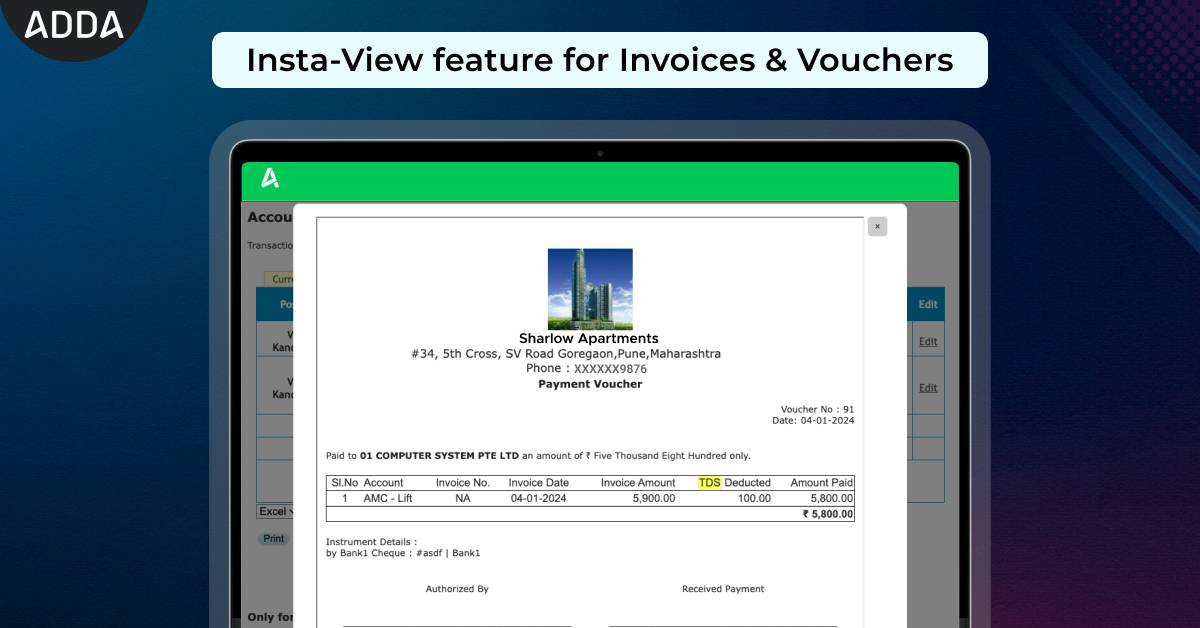
As an Admin are you often struggling to access multiple invoices during audits?? Switching between pages to view each document slows down the workflow, wastes time, and disrupts focus, especially when reviewing multiple invoices. This back-and-forth navigation makes it hard to maintain context and adds unnecessary complexity. 


To solve this, we are introducing Insta-View for Invoices & Vouchers in the Expense Tracker.


Key Benefits - 

Faster Workflow – Admins can quickly check invoice details like Purchase Request , Purchase Order without losing their current position, eliminating the hassle of navigating back and forth.

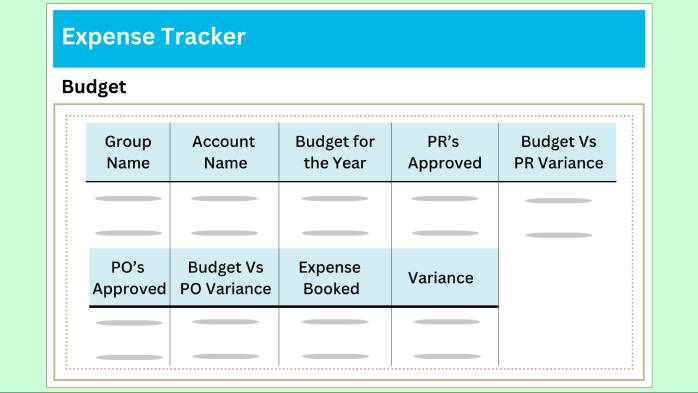
As purchase manager are you struggling to get a complete picture all expenses in your Community? We have now revamped the Budget section to create one view which gives the purchase team a birds eye view of the entire expenses of a Community. 

Comparison of PRs, POs, Expenses with Budget and respective variances, this report has it all!


This feature is presently available only for our Enterprise customers. In case you are interested in this feature, please contact our support team.


Find this feature here: ADDA ERP Admin Side > Expense Tracker > Budget


For large Communities and Enterprise customers who are managing multiple communities, a robust procure to pay cycle is a must have. ADDA provides an extremely comprehensive P2P tool, which is also constantly evolving to constantly add useful features into the module.

In our latest addition, we added few very important features:

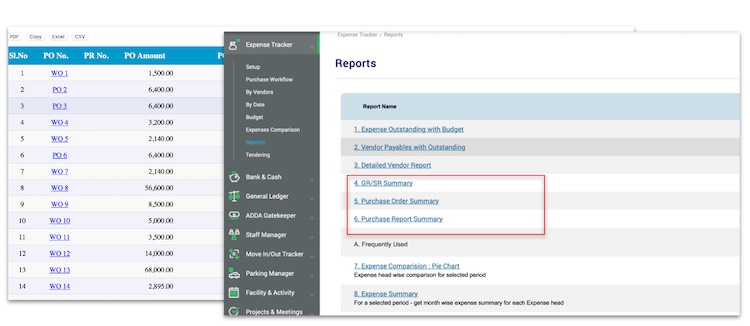
  1. PO, PR and GR/SR reports: These reports give an excellent overview of the purchase process across PR, PO, GR/SR. For example, at a PR level the report show the details of the open PRs, used amounts, balance amounts, variance, etc. 
  2. Maker Checker for Purchase Order creation: ADDA already has multiple levels of approvers which can be configured for POs. Now with the maker checker option, a PO can be checked and necessary corrections can be made even before it goes for approval.

This feature is presently available only for our Enterprise customers. In case you are interested in this feature, please contact our support team.


Find this feature here: ADDA ERP Admin Side > Expense Tracker > Reports

What if end to end Expense management could be carried online?


We can hear the WOWs already!!


ADDA is now ready with it's new feature to make Request For Quotation(RFQ) simpler.


How it works?


When the building management wants to reach out to different service providers, say for Security services or for any common area maintenance,


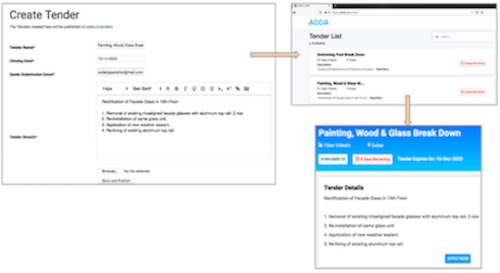
1. Admin can Create a Tender on ADDA with all the details of the services they seek and other terms or conditions. 


2. ADDA publishes this Tender on a public page - adda.io/tender with an unique Tender No., where it becomes visible to all service providers/vendors.


3. All interested vendors can apply for the tender with quotation and their contact details, which is sent back to Building management.


4. Now the building management has multiple quotations to evaluate and choose the best out of and then place the purchase Order.


Note: This feature is available only for Communities using Enterprise version of ADDA.

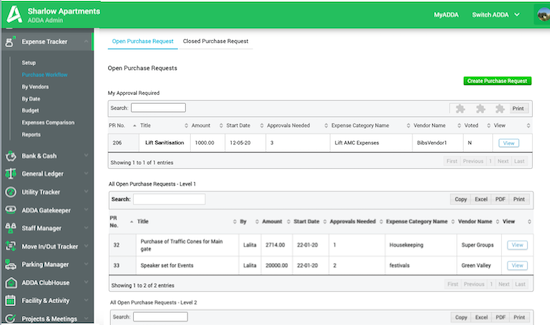
Are you struggling to manage multiple Purchase Requests which are stuck with different approvers in your team? (We have 3 levels of Approvers for PRs in ADDA). 


We have recently introduced this neat categorization of Purchase Requests. 


There is of course the section “My Approval Required” on top of the screen. After this section, there is the list of PRs which are waiting in each stage - All Open Purchase Requests - Level 1, All Open Purchase Requests - Level 2, All Open Purchase Requests - Level 3. 


This categorization can help in faster approval of PRs as Purchase Team has better visibility on PRs pipeline.


Setting up budget for your expenses in ADDA goes a long way in effective expense management in your Community.

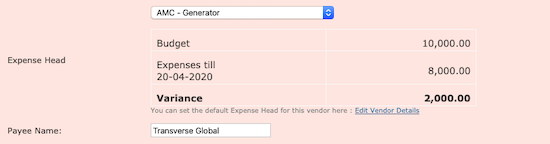
It is very important to get a view into the budget, while doing anything related to Expense Management, example, while raising a PR or while posting an Invoice.

With this enhancement, you will get a view of the budget and variance when any PR is being created or any invoice is being raised.

For better expense management, you can now give specific instructions to your accounting team to not raise invoices/PRs if the amount is above budget or greater than a certain variance. Also, alerts can be sent in case any expense is raised which is above the set budget.


Use it here: Admin View>Expense Tracker>By Vendors>Invoice or In Expense Tracker>Purchase Requests

GST Related Enhancements
  1. Ability to batch upload GST details with expenses: Now easily upload details of GST for your expenses. You will find these Bulk Upload options under Expense Tracker>By Vendors>Direct Posting>Expenses With TDS.
  2. Member and non-member income invoices now have a different sequence of number. This is requirement for GST filing.
Option to attach files while posting payment without invoice
Purchase Request Updates
a) Multi Level Approvals in Purchase Request
You can configure upto 3 levels of approvals for a PR. This will give you more control over PRs being created for high value expenses.

b) Ability to create clones for PRs

In case the PR gets rejected, then it will become easy to create a new one. You can clone the previous one and make edits as required and re-send for approval.
  • Along with Purchase Request Notes, attachments can also be uploaded.  This is useful when additional documents, like certificates etc., had to be uploaded. 
When TDS was not deducted while making a payment to a Vendor, there is a provision in ADDA to pass these entries separately in Bank & Cash > TDS & Service Tax > TDS > Enter TDS Payable. These entries used to reflect in Trial Balance as TDS Paid Separately. However, it did not show up in the Vendor account statement - so the future payments can be adjusted. 

Based on the feedback we received from various Treasurers and Auditors - we have updated this workflow.

Now when a TDS is paid separately, a matching entry is passed into Advance Paid to Vendors. This can be allocated against any open invoice the vendor has, and the amount can be adjusted correctly. Also the TDS Paid Separately entries in Trial Balance and Balance Sheet have been migrated into Advance Paid to Vendors. 

Why write cheques anymore when you can print it. Yes - cheque printing now available for Vendor Voucher Payments.
Now you can scan and upload vendor invoices while creating invoices. We are inching closer to a 100% paperless office.
You can now post Advances that you give to vendors so they can procure material to begin work or an Advance as Salary to your Office Staff.

Later when the vendor presents the invoice or you prepare the Salary for the next month, you can allot this Advance Payment to the open invoices. 

When you pull up the Vendor's Account Statement from Expense Tracker, you now have a new Tab called "Advance Payments". Here you can post the Advance Payments, Do the allotments etc. 

All the relevant entries get passed, so any time you can go to Trial Balance > Assets > Advance Payment to Vendors – and you can get a snapshot of the Advances you have given to the vendors. 

Piece of Cake.
For Expense Invoices, the Date of the invoice can now be edited. For Expense Payments, the Date of Payment, Instrument No, Bank Account can be changed. Both these can be done by clicking on the Edit link next to the respective entries. 
Expense Tracker > Expense Comparison can now be exported to Excel. Also included in Excel is the Group GL Nos that you have assigned in General Ledger > Chart of Accounts - so you can slice dice and do your excel jaadoo on your expenses. 
Now you can override the Service Tax and TDS component with a self computed amount while posting an Invoice for a vendor. By default the % is shown, if you want to over ride choose Amount from the drop down. 
We have released batch upload of expenses using Excel. This upload will post both the invoice and payment automatically. You can find the Batch Upload button under Expense Tracker > By Vendors - scroll to the bottom. 
In Vendor account statement now you can click on the Vendor invoice number ( NA if no invoice number was entered ). The actual amount presented by the vendor, the TDS that was deducted and the Input Service Tax that got posted are all shown for your ready reference. 
Purchase Request now supports upto 3 file Attachments ( like vendor quotations etc. ). These files automatically show up in your Admin Files section under a folder "Purchase Request Documents". 
Purchase Requests now show the designation of the Approvers. 
Expense Tracker Enhancements [ Read More ]
Introducing the Automated Purchase Request Workflow
Enhancements to Expense Tracker