To keep the webinar smooth and ensure every question is captured, all attendees will join as viewers. This means your mic and camera will be off, and questions should be shared using Google Meet’s built-in Q&A feature.
Table of Contents
Webinar Format :
First 30 minutes: Main session / presentation
Last 30 minutes:Live Q&A — we’ll address the questions posted in the Q&A section
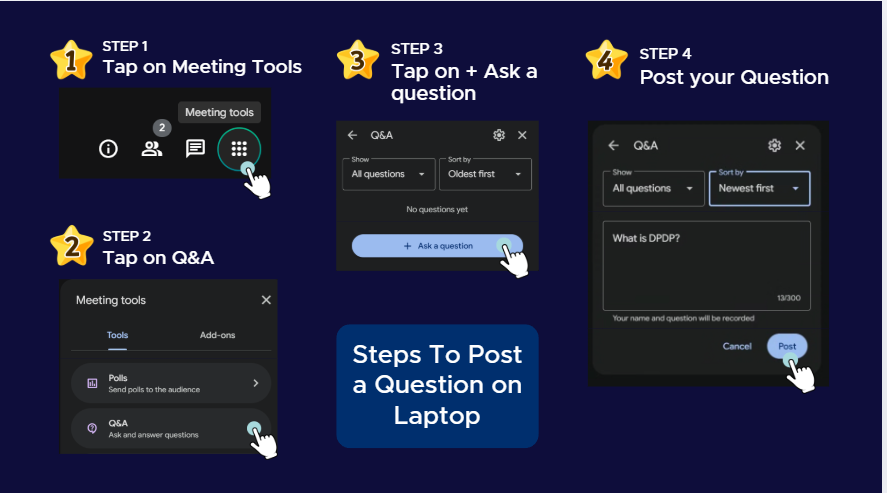
1) Viewer navigation to Q&A on Laptop
Join the meeting.
Look at the bottom control bar for an icon usually called: Activities, Tools, or Meeting tools Click it.
choose Q&A.
Click Ask a question → type → Post.
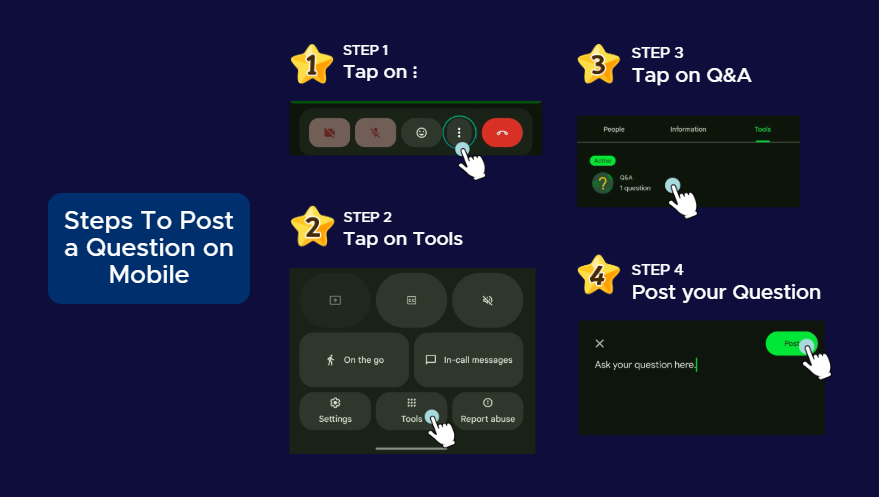
2) Viewer navigation to Q&A on Mobile (Android/iPhone)
Viewer navigation to Q&A on Mobile (Android/iPhone)