“A budget tells your money where to go — instead of wondering where it went.” This maxim which applies to personal finance, applies equally, if not more appropriately, to the finances of a residential community where there are hundreds of units, dozens of vendors, and crores of rupees in collective funds every single year.”
If you are the Treasurer, the Managing Committee Chairperson, or the Estate Manager of a residential community, you already know that end-of-year financial surprises are really the incidents you hate the most.
Often these surprises take many different shapes:
- Maintenance reserves running short, or
- A vendor invoice that nobody approved, or
- An expense head that quietly ran 40% over budget for three months straight — noticed only during the annual audit.
The ADDA Budgeting Module exists to make sure none of that happens.
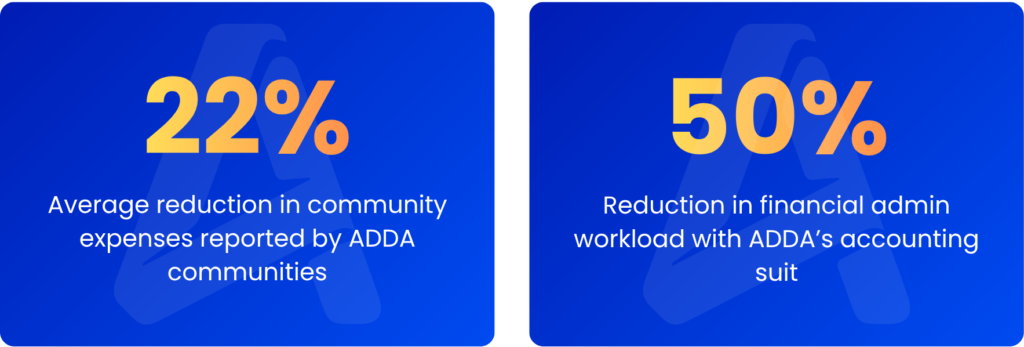
Communities using budgeting module religiously, reports the following tangible benefits:
In ADDA, Budgeting is not a simple “set a number and track against it” feature. The budgeting capability within ADDA’s Expense Tracker is a full financial control system — covering budget planning, real-time variance tracking, automated spending controls, multi-dimensional reports, and maintenance fee validation, all in one place.
Let’s go deep on exactly how it works, what problems it solves, and why communities using it consistently run tighter, more transparent finances.
Table of Contents
Where Does the Money Actually Go? A Typical Indian Housing Society
Before talking about how to budget, it helps to understand what a real community’s expense structure looks like. Here is an actual annual expense breakup from an Indian apartment complex – just a typical indicative representation.
200 – 500 Units
- Annual Maintenance Collection can range between: Rs.40 lakhs – Rs.6 Cr.
- Annual Operational Expenditure can range between Rs.32 lakhs – Rs.5 Cr.
Above 1000 Units
- Annual Maintenance Collection can range between Rs.2 Cr. – Rs.32 Cr.
- Annual Operational Expenditure can range between Rs.1.07 Cr. – Rs.26 Cr.
These are not abstract numbers. A mid-sized apartment complex of 300–400 units is collectively managing Rs.2–3 crore of public money every year money that belongs to residents, collected for a specific purpose, and for which the Managing Committee is fully accountable. A large community of 1,000+ units may be managing upwards of Rs.8–10 crore annually.
And where does that operational expenditure actually go? Across communities of all sizes on ADDA, the expense structure is remarkably consistent:
The pattern is striking: nearly 41% of all community expenditure goes to manpower — security, housekeeping, gardening, and accounting staff combined. Repair & Maintenance takes another 17%. Water and electricity together account for roughly 21%. These three buckets alone — manpower, R&M, and utilities — represent close to 80% of what a housing society spends every year.
That concentration matters enormously for budgeting. A 10% overrun on manpower in a 500-unit community running Rs.2.5 crore in expenses isn’t a rounding error — it’s Rs.10–12 lakhs that nobody planned for. An unexpected repair job in August that exhausts the R&M budget by September leaves the committee scrambling for the rest of the financial year.
The question every Managing Committee should be able to answer, at any point during the year, is: for each of these heads, are we on track, underspent, or overspent — and by how much?
Without a proper budgeting system, that answer only comes at month-end, if at all. For most communities scrutiny of expenses only happens at year end during audits.
With ADDA, this information is available at any moment, on any device, to every authorised committee member.
The Real Problem: Why Community Budgets Usually Fail
Most residential communities — even well-run ones — approach budgeting with the same annual ritual: the Treasurer opens last year’s spreadsheet, adjusts a few numbers upward for inflation, and circulates the result to the committee for approval. It looks neat. It looks thorough. But it rarely works the way it should.
Here’s why:
| What communities typically experience | What communities actually need |
|---|---|
| Budget is set in April and mostly forgotten by June | Real-time tracking of spend vs. budget across every expense head, all year |
| Overspending in Repair & Maintenance is discovered during Audits at end of financial year, not during the spend | Variance alerts and purchase request controls before money is committed |
| New budget is prepared by guesswork and memory | Previous year actuals, and month wise expense comparisons are available per expense head in a single click |
| Nobody can say with confidence what is the logic for collecting the maintenance fees being collected presently | Mathematical per-unit cost derivation from the budget and expense actuals itself |
| PRs and invoices are raised without checking available budget | Budget and variance shown at the point of raising every PR or invoice |
| Expense reports require manual compilation in Excel | Live, filterable reports accessible 24×7 to the entire management committee |
ADDA’s budgeting module addresses every one of these gaps — not piecemeal, but as an integrated system.
How the ADDA Budgeting Module Works
The budgeting feature lives inside the Expense Tracker module in ADDA — specifically under Expense Tracker → Budget. Here is a walkthrough of the core capabilities.
1. Setting Up the Annual Budget
You can set a budget for every expense head in your community’s chart of accounts — whether that’s Security Services, Housekeeping, Utilities, Landscaping, Insurance, Repairs & maintenance, Events, or any other category your community tracks. Budget setup supports three approaches:
- Manual setup — enter amounts head by head within the ADDA interface
- Excel upload — bulk-import your budget from a spreadsheet in a single step
- Clone from previous year — copy last year’s budget as a starting point and adjust from there
The “Clone Previous Year” option is particularly powerful for management committees that are doing this for the first time. Rather than building from scratch, you start with what was actually spent — and refine it with committee input.
Example: A large apartment complex sets its annual budget across 13 expense heads. Manpower (security + housekeeping + gardening) is budgeted at roughly Rs.2.1 crore — nearly 40% of the total. Repair & Maintenance gets Rs.85 lakhs. Once these numbers are in ADDA, the committee has an instant visual of where every rupee of the planned Rs.5+ crore is going — by category, by percentage — before the financial year even begins.
2. Real-Time Budget vs. Actual Tracking
Once the budget is live, ADDA tracks every posted expense invoice against the relevant budget head in real time. You don’t need to run a month-end process or wait for someone to update a spreadsheet. As soon as an invoice is posted in Expense Tracker, the numbers update.
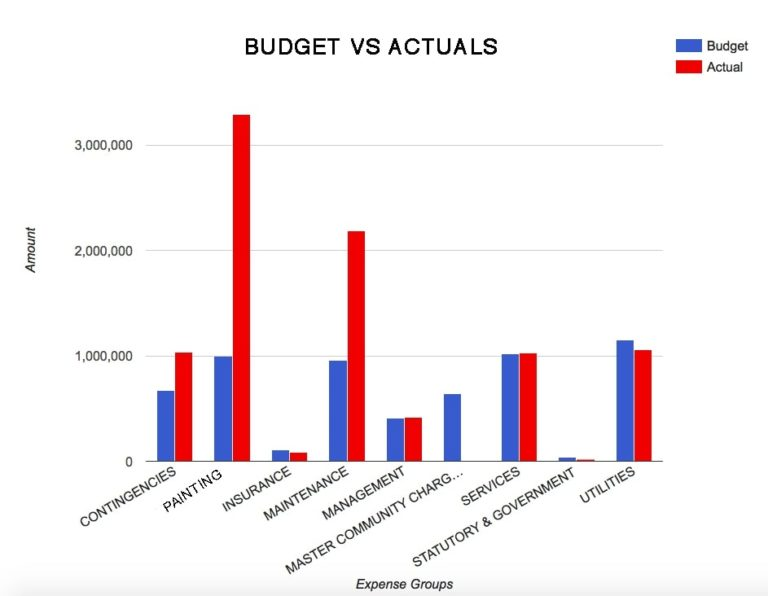
The Budget vs. Actual view shows you, at any point during the year:
- Total budgeted amount per expense group
- What has actually been spent to date
- The remaining variance — how much headroom is left, or how much has been overrun
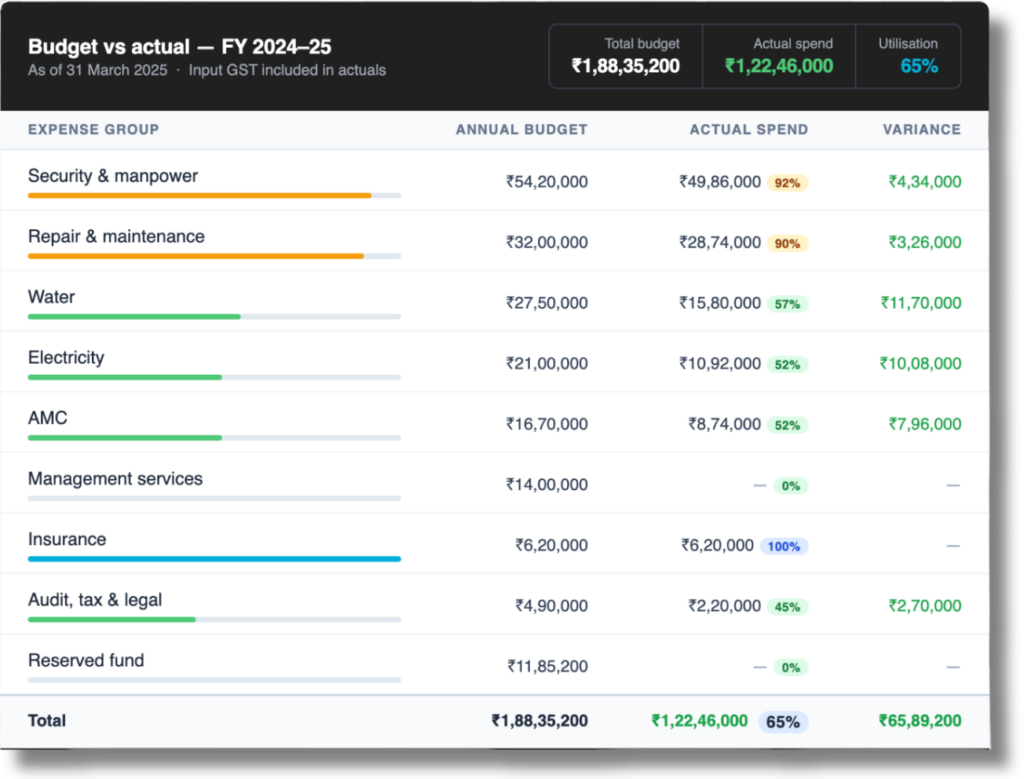
This works at two levels. At the group level, you see, for example, that your total Repair & Maintenance budget of Rs.85 lakhs has Rs.52 lakhs spent by September — which, pro-rated, is on track.
At the line-item level, you can drill down and see that the DG Set Repair sub-head has already consumed 90% of its annual budget in the first seven months, signalling that a budget revision or spending review is needed before December.
3. Year-on-Year Expense Comparison
Before you can plan next year’s budget sensibly, you need a clear picture of what happened this year — and the year before. ADDA’s Expenses Comparison report gives you a month-by-month breakdown of every expense head for any date range you choose.
This means you can see, for instance, that your Water expenses peak between April and July every year due to summer demand — information that should directly shape your budget allocation and cash flow planning. Or that your security manpower costs have been creeping up 8–10% annually, compounding in a way that isn’t obvious if you only look at the annual total. Or that your electricity costs spiked in a particular month due to increased DG usage — something you’d want to factor into next year’s budget for that head.
Water Expense Comparison YoY
With charts like the above, reasoning behind expenses can be easily derived – For example, in this case, the committee is able to quickly deduce the reasons behind high water spend; FY 2022–23 was a normal year with the usual summer peak. FY 2023–24 saw a water tanker crisis in Jun–Aug where costs nearly doubled mid-year as borewells ran dry. FY 2024x–25 recovered after the committee renegotiated the tanker contract in Q2, bringing H2 costs down significantly.
These patterns are invisible in a static spreadsheet. In ADDA, they’re right there — sortable, filterable, and exportable.
4. Budget Variance Warning at the Point of Spend
This is one of the most operationally important features in the module — and it directly addresses one of the most common failure points in community financial management.
When anyone on your team raises a Purchase Request (PR) or posts an invoice in Expense Tracker, ADDA automatically shows the budget position for that expense head at that moment: total budget for the year, amount spent to date, and the remaining variance.
So if your AMC for a firefighting system has a budget of Rs.9,03,000 for the year and Rs.6,75,000 has already been spent, any new invoice raised against that head will surface the fact that only Rs.2,28,000 remains right there, at the point of approval. The Treasurer or approving committee member sees this before approving, not after.
New invoice — Expense Tracker
Going further with hard budget controls: Communities can configure ADDA to block PRs or invoices from being raised if they exceed the set budget or breach a defined variance threshold. Automatic alerts can also be triggered — notifying the Treasurer or Manager whenever an expense is raised above the budget limit for that head. This turns ADDA from a reporting tool into an active financial control system that enforces discipline at the source.
5. The “All Things Budget in One View” Report
For committees and purchase managers who want a birds-eye view of the community’s entire expense picture, ADDA provides a consolidated budget report that shows, for every expense group and account, the following in a single screen:
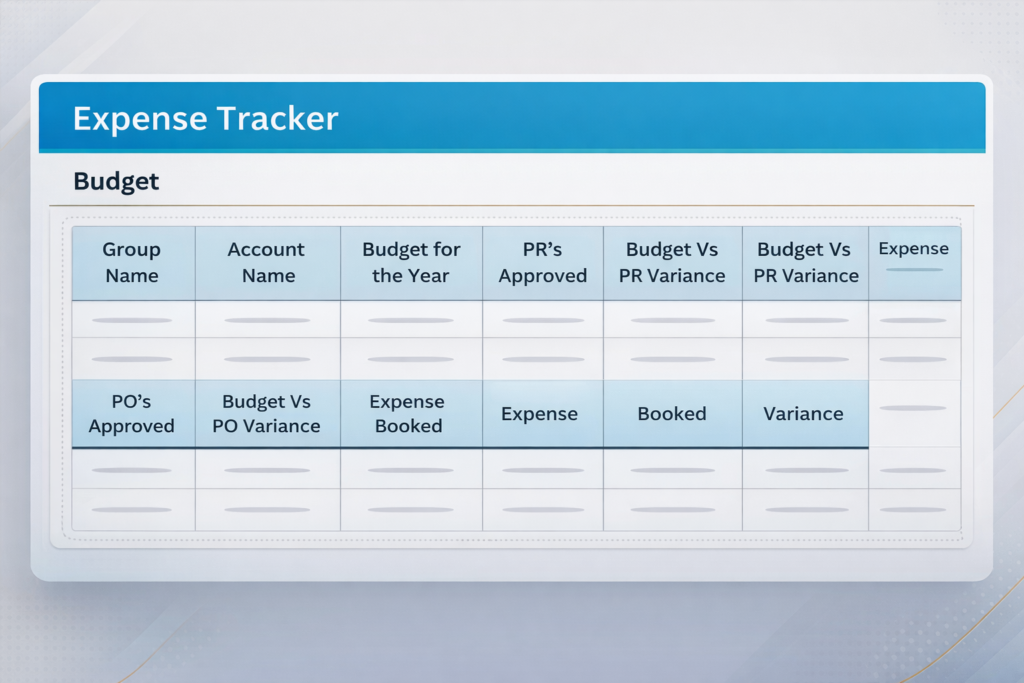
Budget for the Year – The sanctioned budget amount set at the start of the financial year.
PRs Approved – Total value of purchase requests approved against this head, whether or not invoiced yet.
Budget vs. PR Variance – How much of the budget is already committed through approved purchase orders.
POs Approved – Purchase orders raised and approved for the vendor expenses
Expense Booked – Actual invoices posted and entered into the accounting system.
Final Variance – The net remaining available budget after all commitments and actuals.
This single-screen view eliminates the need for Treasurers or Purchase Managers to compile data from multiple sources. It is particularly valuable for Enterprise communities, where this report is accessible directly from ADDA ERP Admin Side → Expense Tracker → Budget.
Budgeting in ADDA is not a feature. It is the financial backbone of the platform.
Most software treats budgeting as a reporting afterthought — you spend money throughout the year, and then at some point you generate a report that tells you how you did against the budget. By then, of course, it is too late to do anything about it.
ADDA is architected differently. The moment you set a budget for an expense head, that budget does not sit quietly in a spreadsheet waiting to be compared at year-end. It becomes live, embedded intelligence — woven into every single expense-related action that happens on the platform from that point forward.
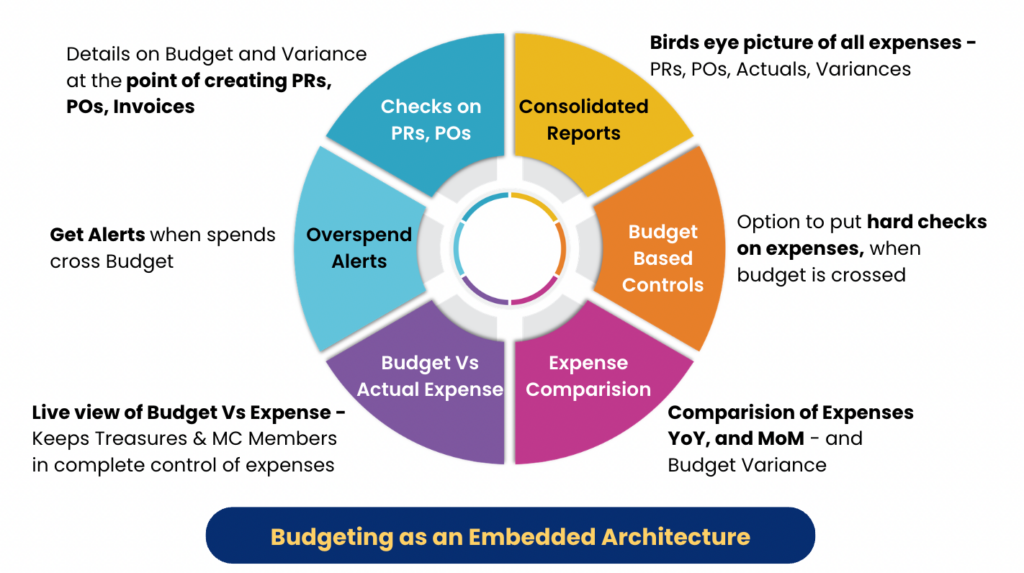
Think of it this way. You set your annual budget for Security Manpower at Rs.54 lakhs. That number now travels with you everywhere inside ADDA.
When your admin raises a Purchase Request for a new security agency contract, the budget is right there, showing how much has already been committed and how much remains. When an invoice comes in for approval, the budget position for that expense head surfaces automatically, before anyone clicks approve.
When the Treasurer logs in on a Tuesday morning to check how the community is doing financially, the live Budget vs Actual dashboard is already waiting, updated to the minute.
When the committee wants to understand why Water expenses ran high in Q2, the month-by-month Expense Comparison report has the answer. When it is time to set next year’s budget, the previous year’s actuals are there in a single click, no spreadsheet archaeology required. And when any expense, at any level, looks like it is about to breach the budget threshold, an automatic alert goes to the Treasurer before the overrun happens, not after.
This is what it means for budgeting to be platform-level architecture rather than a standalone feature. It is not a module you visit once a year. It is a control layer that is quietly active in the background of every PR raised, every invoice approved, every report generated, every alert sent.
The practical consequence of this is significant. Communities that use ADDA’s budgeting properly do not get end-of-year surprises. They do not discover in February that Security costs ran 18% over budget which was done in August. They do not go into an AGM unable to explain to residents why maintenance fees need to go up. The budget set becomes a live guardrail that the entire expense management process runs against, all year long.
Set it once. It stays active everywhere.
Why This Matters: The Benefits in Plain Language
Prevents Overspending Before It Happens:
Budget controls and variance warnings at the point of PR/invoice creation mean overspending is stopped upstream, and not left to be discovered during the audit. Communities with strict budget controls report significantly fewer end-of-year financial surprises.
Gives the Full Committee Real-Time Visibility
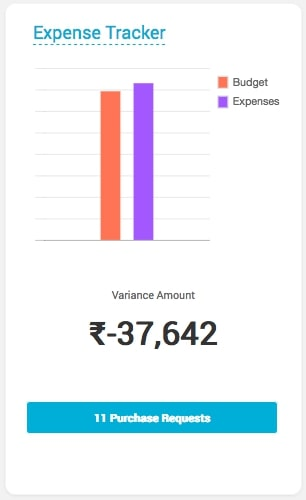
The committee no longer has to wait for the monthly report to come from the Accountant. The Budget vs. Actual view is live, accessible 24×7, and drillable to the line-item level. Transparency increases; bottlenecks reduce. And ultimately this results in better financial control which results in healthy finances for the community.
Makes Annual Budget Preparation Fast and Data-Driven
With previous year actuals available per head in a single click, and the Clone Previous Year feature, new budget preparation goes from a multi-day effort to a matter of an hour. And it’s based on real data, not memory.
Enables You to Save for Unexpected Expenses
A dedicated Contingency or Reserved Fund line in the budget ensures that funds are set aside proactively and not scrambled for when the lift breaks down or the STP needs emergency repair. ADDA tracks these contributions and balances just like any other expense head.
Validates (and Justifies) Your Maintenance Charges
When a resident asks “why did maintenance fees go up this year?”, the answer needs to be grounded in numbers. ADDA’s budget reports help committees arrive at the minimum per-unit maintenance charge needed to cover budgeted expenses — and communicate this clearly to residents.
Surfaces Year-on-Year Cost Trends
Month-by-month expense comparison across financial years makes it easy to identify vendor cost creep, seasonal spending patterns, or categories where good management has actually brought costs down over time.
Dramatically Reduces Audit Preparation Time
With automated, error-free entries and live budget reports, year-end audit preparation is far less stressful. Everything is already organised, categorised, and available in ADDA.
Who Uses This Feature and How
The budgeting module is designed to serve multiple roles within a community, each with different needs:
The Treasurer
Needs complete confidence that the community is not overspending on any head, and needs to produce credible budget proposals each year without spending weeks on it. ADDA gives the Treasurer live variance data, previous-year actuals in one click, and a clean report that can be shared with the committee or the auditor.
The Managing Committee
Wants visibility without having to request reports from the Treasurer or Accountants every time. The Budget vs. Actual dashboard and budget summary are accessible to committee members directly in ADDA — so they can check financial health anytime, not just at the monthly meeting.
The Purchase Manager / Admin
Needs to know, before raising any PR, whether a budget is available for that expense head. Instead of checking every time with the Accountant or Treasurer, a live view into the budget in the system makes decision making much faster and easier. The budget and variance display embedded in the PR creation workflow means this check happens automatically — every single time.
The Community/Estate Manager
Needs to demonstrate financial stewardship to the committee and to owners. A consolidated budget report showing budget, commitments, and actuals across all heads is the cleanest possible evidence of disciplined financial management.
A Note on Maintenance Fee Validation
One of the more underappreciated uses of the ADDA budgeting module is maintenance fee validation, and it’s worth dwelling on this.
Most communities set their maintenance fee based on precedent: last year’s amount, adjusted up by some percentage. But this approach disconnects the fee from what it actually costs to run the community. If your expenses have grown — due to more AMCs, higher utility costs, or a new compliance requirement — you may be chronically under-collecting. If you’ve optimised your collections, negotiated better vendor contracts, or reduced default rates (all of which ADDA helps with), you may actually be able to reduce fees over time.
ADDA’s budgeting module makes the connection explicit. Once your annual budget is set per expense head, ADDA can derive the per-unit maintenance amount needed to cover those expenses — accounting for your total built-up area or unit count. This is not an estimate; it is a mathematical derivation from your actual planned expenses.
“Several residential communities using ADDA have reduced their maintenance charges over time — not by cutting services, but by improving collections to near 100% and opening additional income channels within the platform. The budget module makes this optimization visible and measurable.“
Getting Started with Budgeting in ADDA
If your community is already on ADDA, the budgeting module is accessible from Expense Tracker → Budget in the Admin panel. You can start by:
- Reviewing your current expense heads under Expense Tracker Setup
- Setting budgets for the current financial year — manually, via Excel upload, or by cloning the previous year
- Reviewing the Budget vs. Actual report to immediately see your current financial position
- Configuring budget control settings — deciding whether to block or alert on PRs/invoices that breach the budget
- Sharing the consolidated budget report with your full Managing Committee of even Residents at the next meeting
For communities setting up budgeting for the first time, ADDA’s Customer Success team provides onboarding support to help structure your expense heads and configure budget controls appropriately for your community size and governance model.
Frequently Asked Questions
Is the budgeting module available on all ADDA plans?
Core budgeting features budget setup, Budget vs. Actual tracking, and variance reports are available across ADDA plans. The consolidated “All things Budget in one view” report (showing PRs, POs, expenses, and variances in a single screen) is available for Enterprise customers. Contact ADDA’s support team to understand what’s available on your plan.
Can I set budgets mid-year, or only at the start of the financial year?
You can set or update budgets at any point during the year. If you update a budget mid-year, the variance calculations will reflect the new budget value going forward.
What happens if an expense head has no budget set?
ADDA will still track expenses against that head. The budget column will show zero, and the variance will reflect the full amount spent as “over budget.” It’s best practice to set budgets for all active expense heads.
Does ADDA integrate budget controls with the Purchase Request workflow?
Yes. The budget and variance for the relevant expense head is displayed whenever a Purchase Request or invoice is raised in Expense Tracker. Community admins can also configure hard controls — blocking PRs that exceed budget — or soft alerts, sending notifications to the Treasurer when an expense is raised above budget.
Can residents see the budget and actual expense data?
The budget and financial reports are accessible to admin users and committee members. Communities can choose to publish certain financial reports to residents through the ADDA resident-facing app, supporting transparency with the broader community.
The Bottom Line
Managing community finances, and keeping it in a healthy and growing state, is not simple.
You have dozens of vendors, multiple expense categories, monthly collections, reserves to maintain, and a committee of volunteers who all need to be kept informed. Doing this well, without the right tools, means the Treasurer spending evenings on spreadsheets, taking leaves from office to finish the audit, the committee making decisions with stale data, and the residents paying fees that are either too high or quietly running a deficit.
ADDA’s budgeting module doesn’t just give you a number to track against. It gives your community a complete financial control layer: visible, real-time, automated where it needs to be, and detailed enough to satisfy even the most thorough auditor.
The communities that use it well don’t just spend less — they spend smarter, plan better, and communicate more confidently with their residents about where every rupee is going.
Ready to take control of your community’s finances?
Talk to an ADDA Product Specialist about setting up the budgeting module for your community — and start the year knowing exactly where your money is going.
Talk to a Product Specialist →